Guide
How to keep track of subscriptions without linking your bank
You can keep track of subscriptions without linking your bank. Make one list of every recurring bill and free trial, write the next charge date next to each one, and set a reminder a few days before it renews. A notes app or spreadsheet is enough if you keep it up to date. A subscription tracker that never asks for a bank password does the same job with less work. Subry is one of those: you add bills from a screenshot of the iPhone Settings subscriptions page or by hand, see a monthly and yearly total, and get a local reminder before you are charged. It does not log into a bank, read your statements, or cancel for you.
Why skip a bank login?
Many popular finance apps find subscriptions by connecting to your bank and reading transactions. That can be convenient, especially if you have forgotten what you pay for. It also means handing a third party access to your accounts, usually through a bank-connection service. Some of those apps will not work at all without a supported checking account.
You do not need that access to keep a useful list. You already know most of what you pay for, and every App Store plan is already in iPhone Settings. A no-bank method is a better fit when:
- You do not want to give an app your bank login or transaction history.
- You only want a list, a total and a warning before the next charge, not a full budgeting app.
- A lot of your subscriptions are billed through Apple, which a bank-linked app still cannot cancel for you.
- You do not have a checking account the other app supports.
A bank-linked app is still the better choice if you want charges found automatically, or you want a service that contacts companies and cancels some card-billed subscriptions for you. Subry vs Rocket Money explains that split fairly.
What the list needs to include
The method only works if each line is something you can act on before the money leaves. For every subscription or trial, record:
- The service name and what it costs, including the yearly amount. $9.99 a month is easier to ignore than $119.88 a year.
- The billing cycle: weekly, monthly, quarterly, yearly, or something custom.
- The next charge date, and whether it is still a free trial.
- Where it is billed: Apple, the company’s own site, or a payment service such as PayPal.
- Keep or cancel.
Once that list exists, the work is to update it when you start a new trial or plan, and to get a reminder in time to cancel. For App Store trials, Apple says to cancel at least 24 hours before the trial ends.
Three ways to do it without linking a bank
A notes app, Reminders, or a spreadsheet
This is private, free and enough if you only have a handful of bills. Put the fields above in Notes or a spreadsheet, or set a repeating reminder in the built-in Reminders app. Our guide on how to set bill reminders on iPhone walks through Apple’s steps, including an early reminder a few days before the date. The trade-off is work: you type every bill, you add up the totals yourself, and nothing imports the subscriptions page in Settings for you.
A no-bank subscription tracker
These apps keep the same kind of list, with reminders and totals, and still never ask for a bank password. Two iPhone options:
- Bobby is a long-running manual tracker. You add subscriptions yourself, from a large catalog or as a custom bill, and it notifies you when a bill is due. It runs on older iPhones (iOS 14 or later) and on Apple silicon Macs, and uses small one-time purchases rather than a subscription. See Subry vs Bobby for a side-by-side.
- Subry is newer and iPhone only (iOS 26 or later). You can add bills by hand, or import Apple-billed subscriptions from a screenshot. It tracks free trials with a “Notify me X days before” reminder at a time you pick, shows monthly and yearly totals, and includes How to cancel help. It does not cancel for you.
Choose Bobby if you want a proven manual list on an older iPhone or a Mac. Choose Subry if you want the Settings list imported for you and a warning before trials and renewals charge.
The subscriptions page in iPhone Settings
Settings → your name → Subscriptions is the official list of plans billed through Apple. It is the right place to cancel App Store subscriptions, and it is the fastest place to start a no-bank list. It will not show services that charge your card or PayPal directly, such as a gym, a phone plan, or a streaming service you signed up for on the web. How to find all your subscriptions on iPhone covers what that page includes and what it misses.
How to build the list on iPhone
- Open Settings → your name → Subscriptions and check every Apple-billed plan, including free trials.
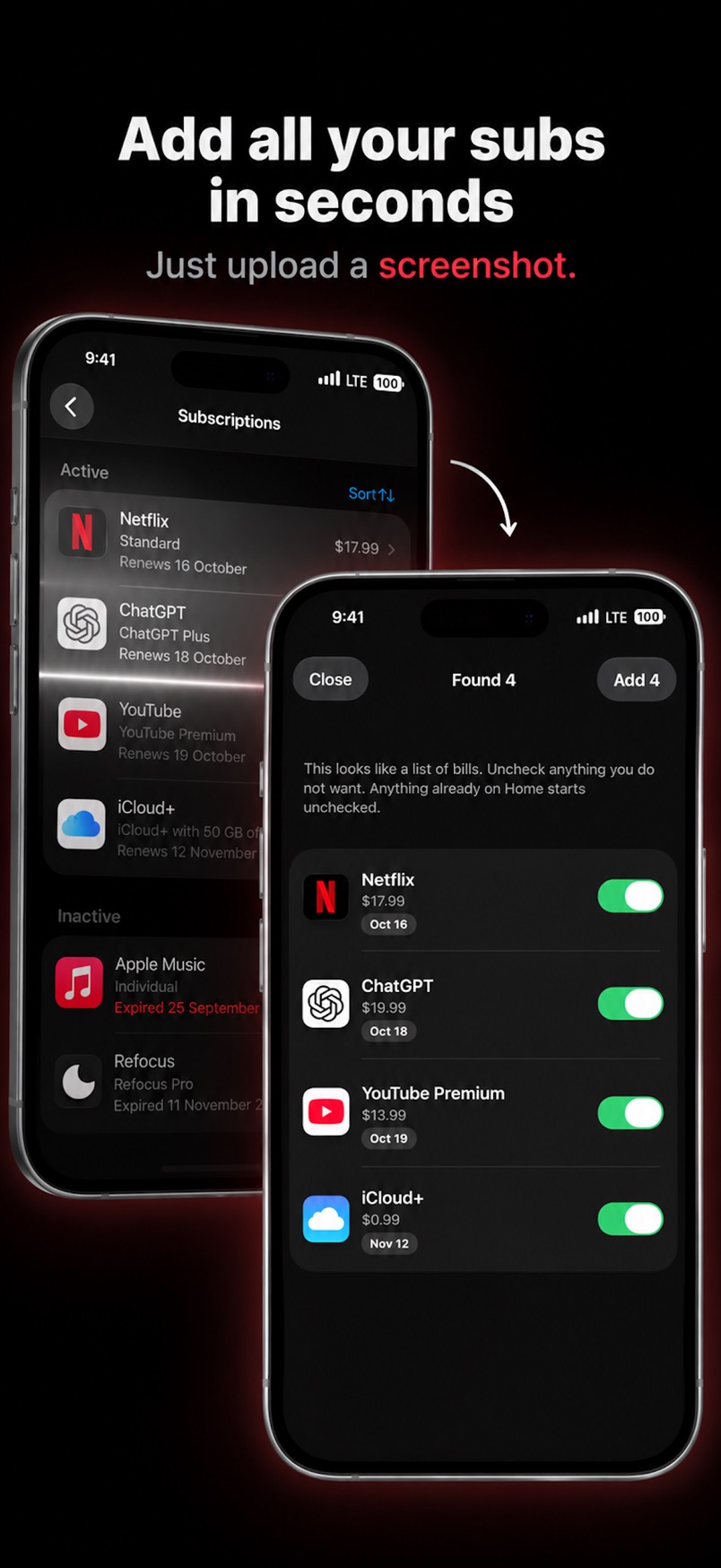
- Add those plans to your list. In Subry, take a screenshot of that page and upload it. Subry detects the apps, prices and renewal dates on the iPhone, and flags anything with no date so you can fill it in. You pick what to keep.
- Add everything Settings does not show, by hand: card-billed services, PayPal plans, shared family bills, and yearly renewals you would otherwise forget. Subry accepts weekly, monthly, quarterly, yearly or custom cycles, and can convert other currencies into the home currency you pick.
- Mark free trials as trials and set a reminder several days before the end date, so you still have time to cancel at least 24 hours ahead for App Store trials. The cancel steps are in how to cancel a free trial on iPhone.
- Turn on reminders for the rest of the list. If you allow notifications, Subry sends a local alert a few days before each charge, and another on the morning it charges. A Home Screen widget can show upcoming bills without opening the app.
What Subry does, and what it does not
Once the bills are in, Subry is a list you can act on:
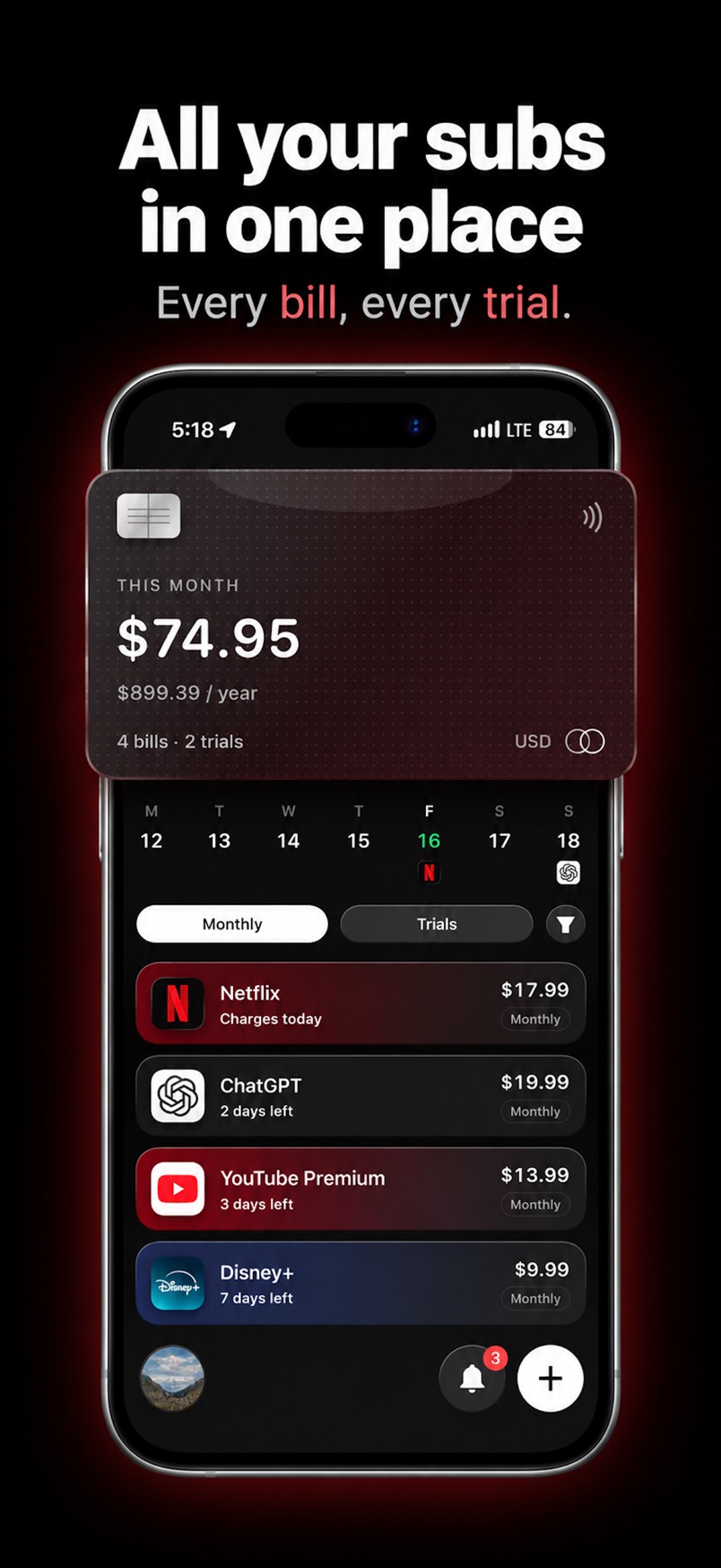
- The home card shows your monthly and yearly total, and how many bills and free trials you track. Our guide on how much you spend on subscriptions a month explains why the yearly number matters.
- A week strip and month calendar show app icons on charge days, with labels such as “Charges today” and “X days left.”
- Each subscription includes How to cancel help. You still cancel in iPhone Settings or with the company.
- When you mark a bill canceled, Subry shows the monthly and yearly amount you keep. It does not cancel the service for you.
Bills stay on the iPhone. Subry does not create an account, does not upload the bill list, and does not use a push server. Notifications are scheduled on the device. It does not read your bank statement, does not see your card number, and does not pay bills. If you want a wider comparison, including bank-linked apps, see best subscription tracker for iPhone.
Track your subscriptions without a bank login
Download Subry on the App Store, add your bills from a screenshot or by hand, and get a reminder before each charge. No bank login. It does not cancel for you. Free to download. Requires iOS 26.

Frequently asked questions
Can I track subscriptions without linking my bank account?
Yes. Make one list of each bill and free trial, with the next charge date, and set a reminder before it renews. You can do that in Notes, a spreadsheet, Apple Reminders, or a no-bank tracker such as Subry or Bobby.
Does Subry read my bank statement or connect to my bank?
No. Subry never logs into a bank and does not read your statements or card number. You add subscriptions from a screenshot of the iPhone Settings subscriptions page or by hand.
How do I add subscriptions if the app cannot see my transactions?
Start with Settings → your name → Subscriptions for every Apple-billed plan. In Subry, screenshot that page and import it, then add card-billed or PayPal services by hand.
When is a bank-linked app a better choice?
When you want charges found automatically from your accounts, or you want a service that can cancel some card-billed subscriptions for you. Those apps still cannot cancel App Store plans. You have to be willing to link a bank.
Can Subry cancel subscriptions for me?
No. Subry reminds you and includes How to cancel help. You cancel in iPhone Settings or with the company that bills you.
Does my subscription list leave my iPhone?
In Subry, the list stays on the iPhone. Subry does not create an account and does not upload the bill list. A full-device iCloud backup, if you use one, is controlled by Apple.