Comparison
Subry vs Bobby: which subscription tracker should you use?
Bobby and Subry are both simple subscription trackers. Neither asks for a bank login: you tell the app what you pay for, and it shows your total and reminds you before a bill is due. The difference is in how the list gets built and what happens around the charge date. Bobby is a well-known manual tracker that has been on the App Store for years, runs on older iPhones and on Apple silicon Macs, and uses small one-time purchases. Subry is newer and iPhone only, but can read your subscriptions from a screenshot, tracks free trials separately and shows charges on a calendar. Choose Bobby for a proven, low-cost manual list. Choose Subry if you want the list built for you and a warning before trials and renewals charge.
Quick comparison
Both US App Store listings were checked on 20 November 2026. We make Subry and have tried to describe Bobby fairly; check its current listing before you decide.
| Subry | Bobby | |
|---|---|---|
| What it is | Subscription tracker and bill reminder | Subscription and fixed-cost tracker |
| Bank login | Never | Not used; you add subscriptions yourself |
| How subscriptions get in | Screenshot import or by hand | Pick from hundreds of existing subscriptions or create your own |
| Free trial tracking | Yes, with “Notify me X days before” at a time you pick | Not mentioned in the listing |
| Reminders | Before the charge and on the morning it charges | A notification when a bill is due |
| Calendar view | Week strip and month calendar with app icons | Overview of subscriptions and upcoming bills |
| Cancel help | How to cancel help for each subscription | Not mentioned in the listing |
| Devices | iPhone, iOS 26 or later | iPhone with iOS 14 or later, Apple silicon Mac, Apple Vision Pro |
| Price, as listed | Free to download; Yearly $14.99, Subry Lifetime $24.99 | Free to download; one-time unlocks from $0.99, All-in-one Pack $1.99 or $2.99 |
| US ratings | Not enough ratings to display an overview yet | 4.7 from about 8,000 ratings |
How Bobby works
Bobby's listing describes itself as “the easiest way to get insights in your fixed costs.” You add subscriptions by choosing from hundreds of existing services or by creating a custom one, and you can enter as much contract detail as you like. Bobby then shows an overview of all your subscriptions and upcoming bills, so you know how much goes out each month, and notifies you when a bill is due.
A few details are worth knowing:
- Pricing is one-time, not a subscription. The listing shows small in-app purchases: Unlock Subscription Limit and Unlock Category Limit at $0.99 each, Security and Visual Packs at $0.99, and All-in-one Packs at $1.99 and $2.99. The names suggest the free version limits how many subscriptions you can add, so check that before you start typing everything in.
- It runs almost everywhere Apple. iPhone with iOS 14 or later, Macs with an Apple M1 chip or later, and Apple Vision Pro, in English and eight more languages.
- It is well established. Around 8,000 US ratings at 4.7 stars. The last update in the listing was in December 2025.
The App Store privacy label for Bobby lists identifiers and purchase history as data that may be linked to you, and usage data that is not linked to you.
How Subry works
Subry's main difference is that you do not have to type your list. Take a screenshot of the subscriptions page in iPhone Settings (Settings → your name → Subscriptions) and upload it. Subry detects the apps, prices and renewal dates on the iPhone and flags anything without a date so you can fill it in. Add bills that are not billed through Apple, like a gym, phone plan or insurance, by hand.
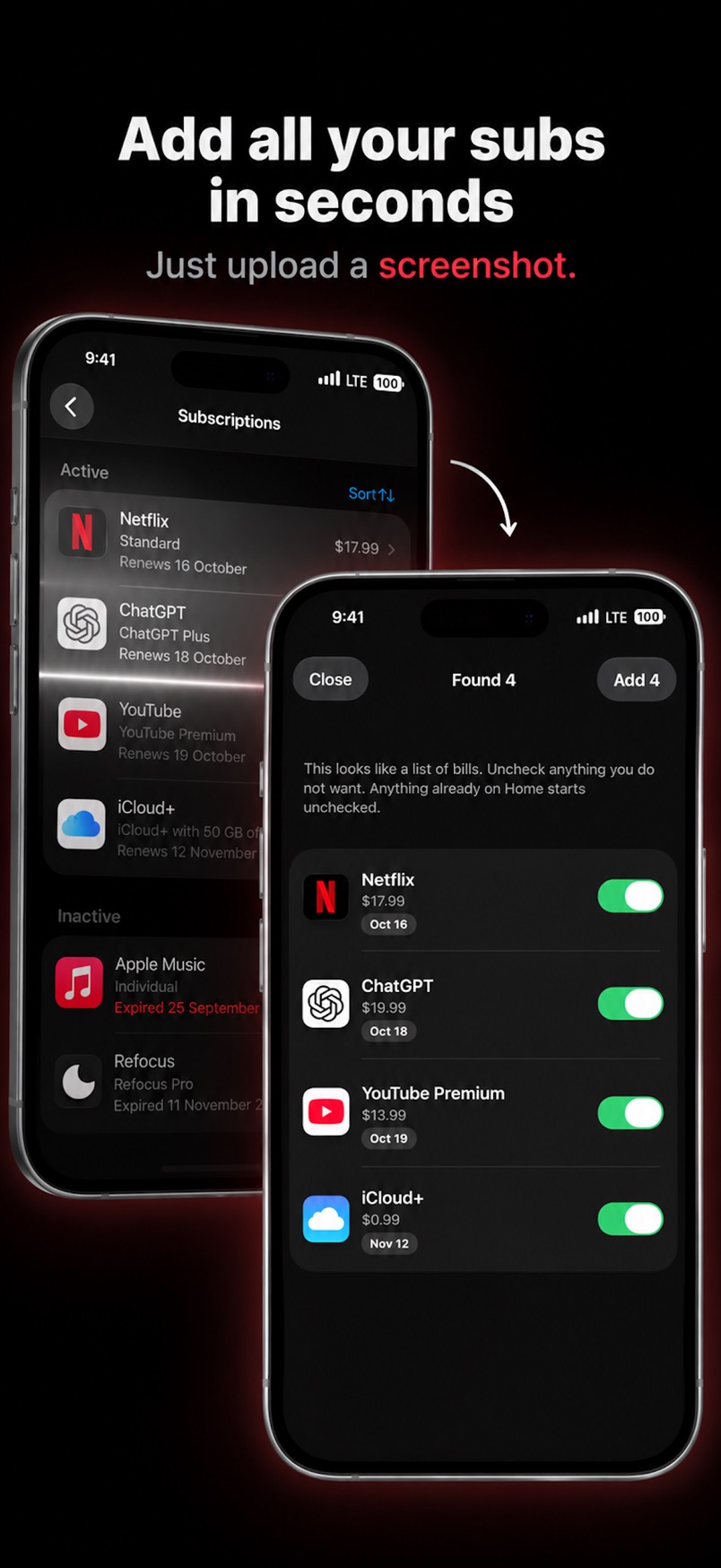
From there:
- The home card shows your monthly and yearly total, plus how many bills and free trials you track.
- Mark a subscription as a free trial and choose “Notify me X days before” at the time of day you want, so you can cancel before the first payment.
- If you allow notifications, Subry sends a reminder before each charge and another on the morning it charges.
- A week strip and month calendar show app icons on charge days, with labels like “Charges today” and “X days left”.
- Each subscription has How to cancel help. When you mark a bill canceled, Subry shows the monthly and yearly amount you keep.
- Home Screen widgets list upcoming charges, and payments in any currency are converted into your home currency.
Bills stay on your iPhone. Subry does not create an account, does not upload your list and never connects to your bank.
Where Bobby is the better choice
- You want the cheapest possible tracker. One-time unlocks from $0.99 cost less than any yearly plan.
- Your iPhone is older. Bobby supports iOS 14; Subry needs iOS 26.
- You want it on a Mac too. Bobby runs on Apple silicon Macs and Apple Vision Pro.
- You want a long track record. Bobby has thousands of ratings; Subry is new.
- You need another language. Bobby lists nine languages.
Where Subry is the better choice
- You do not want to type every subscription. A screenshot of your Settings list does most of the work.
- You start free trials. Subry tracks trials separately and reminds you at the day and time you choose. Apple advises cancelling at least 24 hours before a trial ends.
- You think in charge dates. The calendar and urgency labels show what charges this week at a glance.
- You want help cancelling. Each subscription includes How to cancel steps, and the yearly saving is shown when you cancel.
Which one should you pick?
Ask yourself one question: is your problem remembering what you pay for, or catching charges before they happen? If you just want a tidy list of fixed costs on an older iPhone or a Mac, Bobby is a sensible, inexpensive choice. If you keep getting caught by trials that turn into paid plans, or you never get round to typing your list, Subry's screenshot import and trial alerts are built for that.
For more options, see best subscription tracker for iPhone and Subry vs Rocket Money.
Build your subscription list from one screenshot
Download Subry on the App Store, import your subscriptions from a screenshot of iPhone Settings, and get a reminder before trials and renewals charge. No bank login. Free to download. Requires iOS 26.

Frequently asked questions
Is Subry a Bobby alternative?
Yes. Both track subscriptions without a bank login and remind you about upcoming bills. Subry adds screenshot import, free trial alerts, a charge calendar and How to cancel help. Bobby supports older iPhones and Macs.
Is Bobby free?
Bobby is free to download. On 20 November 2026 the US App Store listed one-time in-app purchases from $0.99, including Unlock Subscription Limit, and All-in-one Packs at $1.99 and $2.99.
Do Subry or Bobby connect to my bank?
No. In both apps you add subscriptions yourself. Subry can read them from a screenshot of your iPhone Settings subscriptions page.
Can Subry or Bobby cancel subscriptions for me?
No. You cancel in iPhone Settings or with the company. Subry includes How to cancel help for each subscription.