Guide
How to find all your subscriptions on iPhone
To see subscriptions billed through your Apple Account, open Settings, tap your name, then tap Subscriptions. That is the official list on iPhone. It is not a list of everything you pay for: website sign-ups, another Apple Account, a family member’s purchases, and carrier bills will not appear there. Subry can turn a screenshot of that Settings page into a list you keep, and you can add the bills Apple does not show — without a bank login.
How do I see my subscriptions in iPhone Settings?
Apple documents these steps in See your purchases and subscriptions in the App Store on iPhone and in Cancel a subscription from Apple:
- Open the Settings app.
- Tap your name at the top.
- Tap Subscriptions.
- Tap a subscription to see the plan, the renewal date, and the option to cancel or change it.
The same Subscriptions list is also available on the web at account.apple.com if you sign in to your Apple Account.
Does that list show every subscription I pay for?
No. The Settings page only knows about charges billed through your Apple Account. Apple’s own support page says that if you cannot find a receipt from Apple, you may have bought the subscription from another company, and you should check your bank or credit card statement and contact that company to cancel.
These usually do not appear in Settings → Subscriptions:
- Subscriptions you started on a company’s website, then billed directly to a card or PayPal.
- Subscriptions bought with a different Apple Account. Apple suggests searching your email for “receipt from Apple” or “invoice from Apple” and checking which account is on the receipt.
- Subscriptions a family member bought. You cannot cancel a family member’s subscription from your account.
- Services billed by a wireless carrier or another provider.
How do I check past Apple charges, not just current subscriptions?
The Subscriptions screen shows what is active or expired now. To review what you were actually charged, Apple’s iPhone guide says:
- Open the App Store app.
- Tap your picture or initials, tap Apps & Purchase History, then tap Purchase History.
- You may need Face ID, Touch ID, or your passcode. You can search and change the date range from the last 90 days.
See Apple’s purchase history steps for the full options, including Family Sharing organizers.
How do I keep one list of Apple bills and everything else?
A tracker is useful when Apple’s list is only part of the picture — Netflix or a gym started on the web, a tool billed yearly, a free trial you do not want to miss. You do not have to hand your bank password to an app to do this.
In Subry you can:
- Open Settings on your iPhone, go to Subscriptions, and take a screenshot of the list.
- Upload that screenshot in Subry. The app detects the apps, prices, and renewal dates on the device, and flags any item with no date so you can fill it in.
- Add anything the screenshot missed — a website plan, a phone bill, a gym membership — by hand.
- See a monthly total and a yearly total, plus a week strip and a month calendar with charge days.
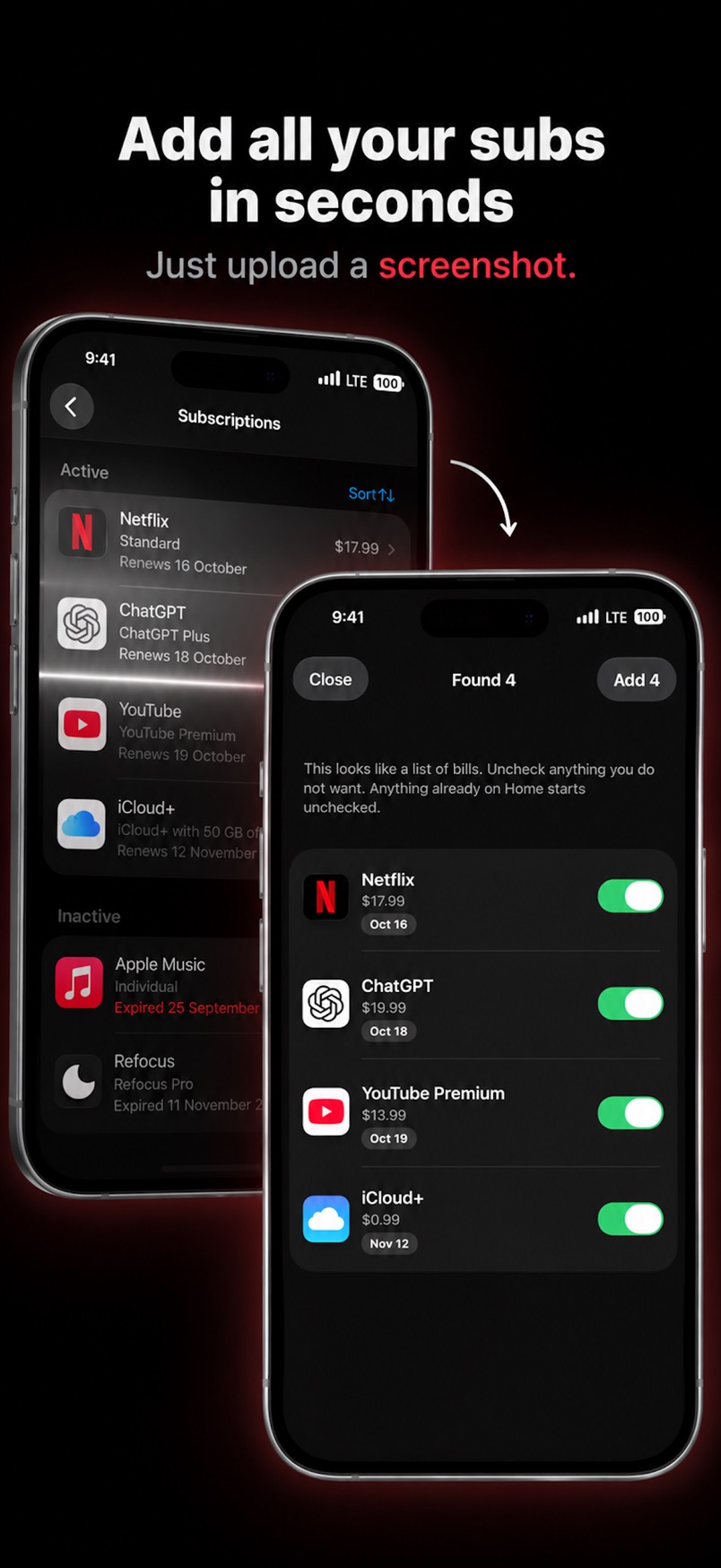
Subry does not create an account and does not log into your bank. You decide what to add. If you allow notifications, it can remind you a few days before a charge, and again on the morning it charges.
How does Subry compare with other subscription trackers?
Apps in this category work in different ways. The differences that matter most are how they find bills, whether they need a bank login, and whether they cancel services for you. Prices change, so check each product’s own site or store listing before you pay. This comparison is about how they work, not about which one is “best” for every person.
| Subry | Bobby | Rocket Money | TrackMySubs | |
|---|---|---|---|---|
| Bank login | Never | Not required — you add bills yourself | Links financial accounts to detect recurring charges | Not required — you add bills yourself |
| How bills get in | Screenshot of your iPhone Settings subscriptions list, or by hand | By hand, from a list of services | Detected from linked account transactions | By hand, with CSV import and export |
| Platform | iPhone | iPhone | iPhone, Android, and web | Web, with mobile access |
| Reminders | Local alerts before a charge, and on the charge morning; trial end alerts | Notifications when a bill is due | Alerts for upcoming renewals, as part of a broader finance app | Email alerts before a payment, with timing you set |
| Cancel for you | No. Includes How to cancel help. You cancel in Settings or with the company. | No | Premium members can request that Rocket Money handle a cancellation | No |
Choose Rocket Money if you want a US-oriented finance app that scans linked accounts and can help cancel on a paid plan. Choose Bobby if you want a simple iPhone list you type yourself. Choose TrackMySubs if you want a web list and email alerts. Choose Subry if you want an iPhone list that starts from a screenshot of Apple’s own subscriptions page, tracks free trials, and never asks for a bank password.
For US App Store ratings and a fuller pick-by-use-case comparison, see best subscription tracker for iPhone.
Get Subry on the App Store
Import a screenshot of your subscriptions, add the bills Apple doesn’t show, and get a reminder before the next charge. Free to download. Requires iOS 26.

Frequently asked questions
How do I see all my subscriptions on iPhone?
Open Settings, tap your name, then tap Subscriptions. That shows Apple Account billing only. For everything else, check email receipts, card statements, and a list you keep yourself — for example in Subry.
Why is a subscription missing from Settings?
It is probably not billed through that Apple Account. Apple recommends searching email for “receipt from Apple.” No Apple receipt usually means another company is charging you.
Does Subry need my bank login?
No. You add bills from a screenshot or by hand. Reading happens on the iPhone. Subry does not log into banks and does not read your card number.
Can Subry cancel a subscription for me?
No. It reminds you, shows How to cancel help, and can show what you save after you mark a bill canceled. You cancel the service yourself.