Comparison
Subry vs Rocket Money: which subscription app should you use?
Rocket Money and Subry both help you see what you pay for every month, but they work in opposite ways. Rocket Money is a full personal finance app: you link your accounts, it finds recurring charges for you, and Premium members can ask its team to cancel some subscriptions. Subry is a small iPhone subscription tracker that never asks for a bank login: you add bills from a screenshot or by hand, and it reminds you before each charge so you can cancel in time. Choose Rocket Money if you want budgeting and someone to cancel for you. Choose Subry if you only want the list, the totals and a warning before you pay.
Quick comparison
Both US App Store listings were checked on 18 November 2026. We make Subry and have tried to describe Rocket Money fairly; check its current listing before you decide.
| Subry | Rocket Money | |
|---|---|---|
| What it is | Subscription tracker and bill reminder | All-in-one personal finance app |
| Bank login | Never | Link accounts; the app relies on a linked checking account |
| How subscriptions get in | Screenshot import or by hand | Found automatically from linked accounts |
| Cancels for you | No; How to cancel help for each subscription | Premium Cancellation Assistant for supported providers; not Apple-billed plans |
| Reminders before a charge | Notify me X days before, at a time you pick | Budget alerts; Rowan (Premium+) texts about price increases and new subscriptions |
| Budgeting, credit score, net worth | No | Yes |
| Requires | iOS 26 | iOS 16.4 |
| Price, as listed | Free to download; Subry Lifetime $24.99 | Free to download; Premium in-app purchases from $2.99 to $9.99 |
| US ratings | Not enough ratings to display an overview yet | 4.5 from about 409,000 ratings |
How Rocket Money works
Rocket Money's listing describes an all-in-one finance app: you link your accounts once, and it finds and tracks your subscriptions, builds a budget by category, tracks spending and net worth, monitors your credit score and can negotiate some bills. Its newest feature, Rowan, is an AI assistant that lives in your text messages and is included with Premium+.
The part most people download it for is cancelling. Rocket Money's help center says the Subscription Cancellation Assistant is currently available to Premium members. You tap Cancel This For Me and its team contacts the provider. It says most cancellations are completed within a few business days, and that a charge may still go through before the cancellation is confirmed.
There are limits worth knowing before you pay:
- If there is no Cancel option, Rocket Money cannot cancel that subscription for you yet, and it shows instructions instead.
- Subscriptions billed through Apple, Google Play, Amazon, Roku or PayPal must be cancelled on those platforms. That includes every App Store subscription on your iPhone.
- The app relies on at least one checking account linked through Plaid. Its help center says that without a supported checking account, you cannot use Rocket Money.
The listing shows several Premium prices without a monthly or yearly label, so check what the paywall shows you.
How Subry works
Subry starts from the list you already have. Take a screenshot of the subscriptions page in iPhone Settings (Settings → your name → Subscriptions) and upload it. Subry detects the apps, prices and renewal dates on the iPhone and flags anything without a date. Add bills that are not billed through Apple, like a gym or phone plan, by hand.
From there:
- The home card shows your monthly and yearly total, plus how many bills and free trials you track.
- Choose “Notify me X days before” at a time of day you pick. If you allow notifications, Subry sends a reminder before the charge, and another on the morning it charges.
- A week strip and month calendar show app icons on charge days, with labels like “Charges today” and “X days left”.
- Each subscription includes How to cancel help. You still cancel in Settings or with the company; Subry does not cancel for you.
- When you mark a bill canceled, Subry shows the monthly and yearly amount you keep.
- A Home Screen widget lists upcoming bills.
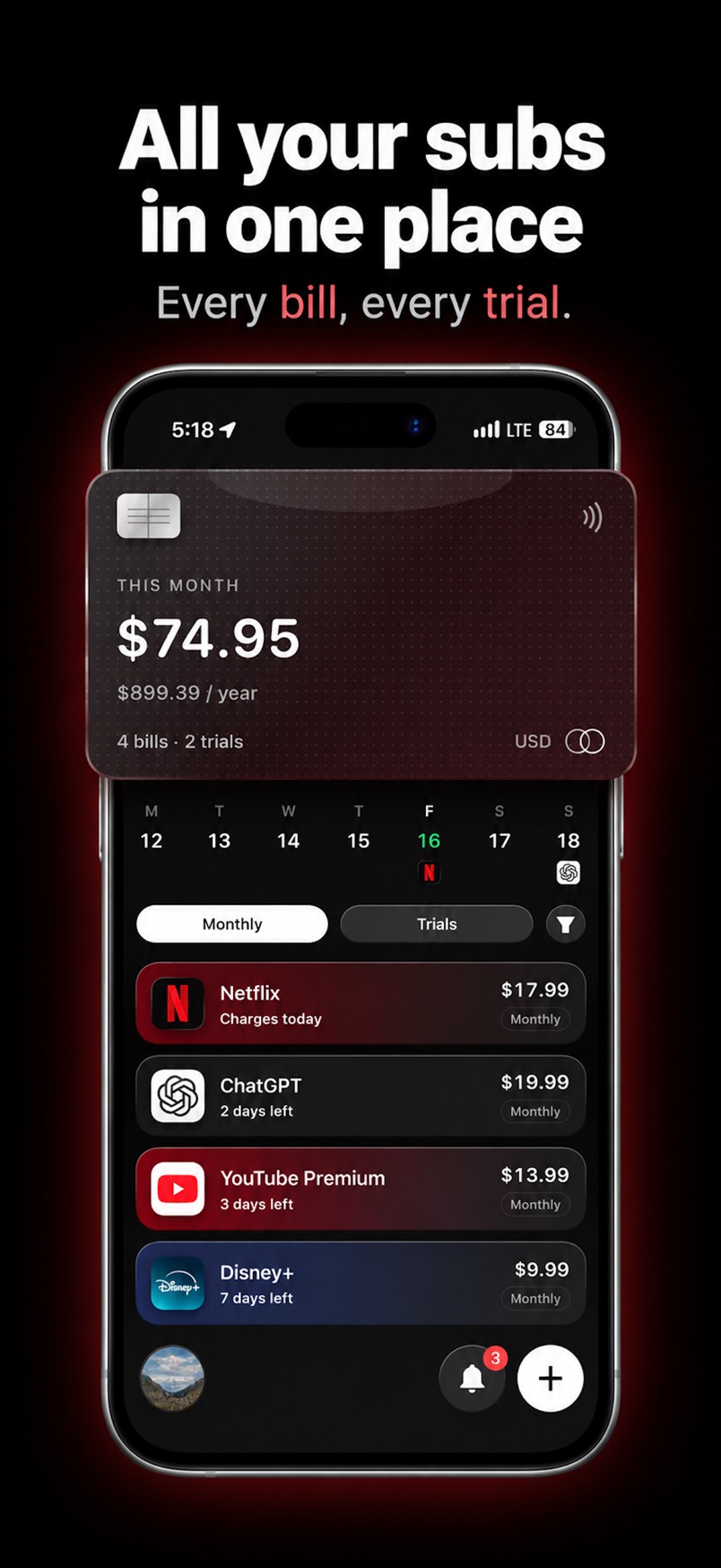
Bills stay on your iPhone. Subry does not create an account and does not connect to your bank.
Where Rocket Money is the better choice
- You want someone else to do the cancelling for card-billed services, and you are happy to pay for Premium.
- You want a full budget, spending categories, net worth and credit score in one app.
- You do not know what you are paying for and want charges found automatically from your bank.
- You want a proven app. It has hundreds of thousands of ratings; Subry is new.
Where Subry is the better choice
- You will not link a bank, or you do not have a supported checking account.
- Most of your subscriptions are billed through Apple. Neither app can cancel those, so a quick import of the Settings list and a reminder before each renewal does most of the work.
- You want free trial reminders timed to the day and hour you choose, so you can cancel at least 24 hours before a trial ends, as Apple advises.
- You want a one-time price instead of another subscription to manage your subscriptions.
Can you use both?
Yes. Some people use Rocket Money for budgeting and Subry for the renewal and trial reminders, especially for App Store subscriptions that Rocket Money cannot cancel. If you only need one, pick by the question above: do you want a finance app with a cancel service, or a simple list that warns you in time?
For more options, see best subscription tracker for iPhone and best app to cancel subscriptions on iPhone.
See every renewal coming, without a bank login
Download Subry on the App Store, import your subscriptions from a screenshot, and get a reminder before each charge. It includes How to cancel help. It does not cancel for you. Free to download. Requires iOS 26.

Frequently asked questions
Is Subry a Rocket Money alternative?
Yes, if what you want from Rocket Money is a list of subscriptions and a warning before charges. Subry does that without a bank login. It does not do budgeting, credit scores or cancel subscriptions for you.
Can Rocket Money cancel App Store subscriptions?
No. Rocket Money's help center says subscriptions billed through Apple must be cancelled with Apple. On iPhone, go to Settings, tap your name, tap Subscriptions, then Cancel Subscription.
Do I need a bank account to use Subry?
No. Subry never asks for a bank login. You add subscriptions from a screenshot of your iPhone Settings subscriptions page or by hand.
Which is cheaper, Subry or Rocket Money?
Both are free to download. On 18 November 2026 the US App Store listed Subry Lifetime at $24.99, and several Rocket Money Premium in-app purchases from $2.99 to $9.99. Check the price you see before you pay.