Guide
How much do I spend on subscriptions a month?
To find out how much you spend on subscriptions a month, add up every recurring charge you still pay — App Store plans, website sign-ups, and other bills — and convert weekly, quarterly, and yearly plans into a monthly figure. iPhone Settings only lists billing through your Apple Account, so that list is usually incomplete. Subry can start from a screenshot of that Settings page, let you add the rest by hand, and show a monthly total and a yearly total on the home overview card.
Why is my own estimate often too low?
People often remember Netflix or Spotify and forget the smaller plans: iCloud storage, a gym they barely use, a news site opened once, a tool billed once a year. Surveys put different numbers on this, because they count different things, but they agree that estimates and itemized totals can be far apart.
In April and May 2022, C+R Research surveyed 1,000 U.S. consumers. People first had 10 seconds to estimate what they spent on subscription services each month: the average was $86. Later, the same people itemized payments across categories such as streaming, apparel, cosmetics, and food. That average was $219 a month — $133 higher. About three-quarters (74%) said it was easy to forget recurring monthly subscription charges, and 42% said they had stopped using a service but were still paying for it.
A more recent snapshot is narrower and lower. The MarketWatch Guides subscription fatigue survey of 1,000 American subscribers, collected on 12 June 2025 and published on 17 July 2025, found that the median subscriber had four subscription services and spent about $60 a month, or $720 a year. One in five (19.9%) said they did not know how many subscriptions they were paying for, and 50.7% agreed with “I feel like I spend too much money on subscriptions.”
Those figures are averages and medians from surveys, not a budget you have to match. The useful number is your own total, including plans that do not show up in iPhone Settings.
How do I add up what I spend each month?
Use more than one source. Apple’s list is the official place to start for App Store billing, but it is not everything you pay for:
- On iPhone, open Settings, tap your name, then tap Subscriptions. That shows plans billed through that Apple Account. The steps, and what that list leaves out, are in how to find all your subscriptions on iPhone.
- Search email for receipts, including “receipt from Apple” or “invoice from Apple,” and check card or bank statements for recurring charges started on a company’s website.
- For each plan, write down the price and the billing cycle. Divide a yearly plan by 12, a quarterly plan by 3, and multiply a weekly plan by 52/12, so everything is on a monthly basis.
- Add the monthly figures, then also multiply the monthly total by 12 — or add the real yearly prices — so you can see what the same stack costs over a year.
That last step matters. A set of $9 and $15 plans can look small month to month and large as a yearly number, which is often when it becomes clearer what to keep.
How can Subry show my monthly and yearly totals?
Subry is an iPhone subscription tracker. It does not log into your bank, so it only totals the bills you add. You can get a first list in quickly, then fill the gaps:
- Open Settings → your name → Subscriptions and take a screenshot of the list.
- Upload that screenshot in Subry. The app detects apps, prices, and renewal dates on the iPhone, and flags any item with no date so you can fill it in.
- Add anything the screenshot missed by hand — a website plan, a phone bill, internet, insurance, or a gym membership. Billing cycles can be weekly, monthly, quarterly, yearly, or custom.
- Check the home overview card for the monthly total, the yearly total, and how many bills and free trials you are tracking.
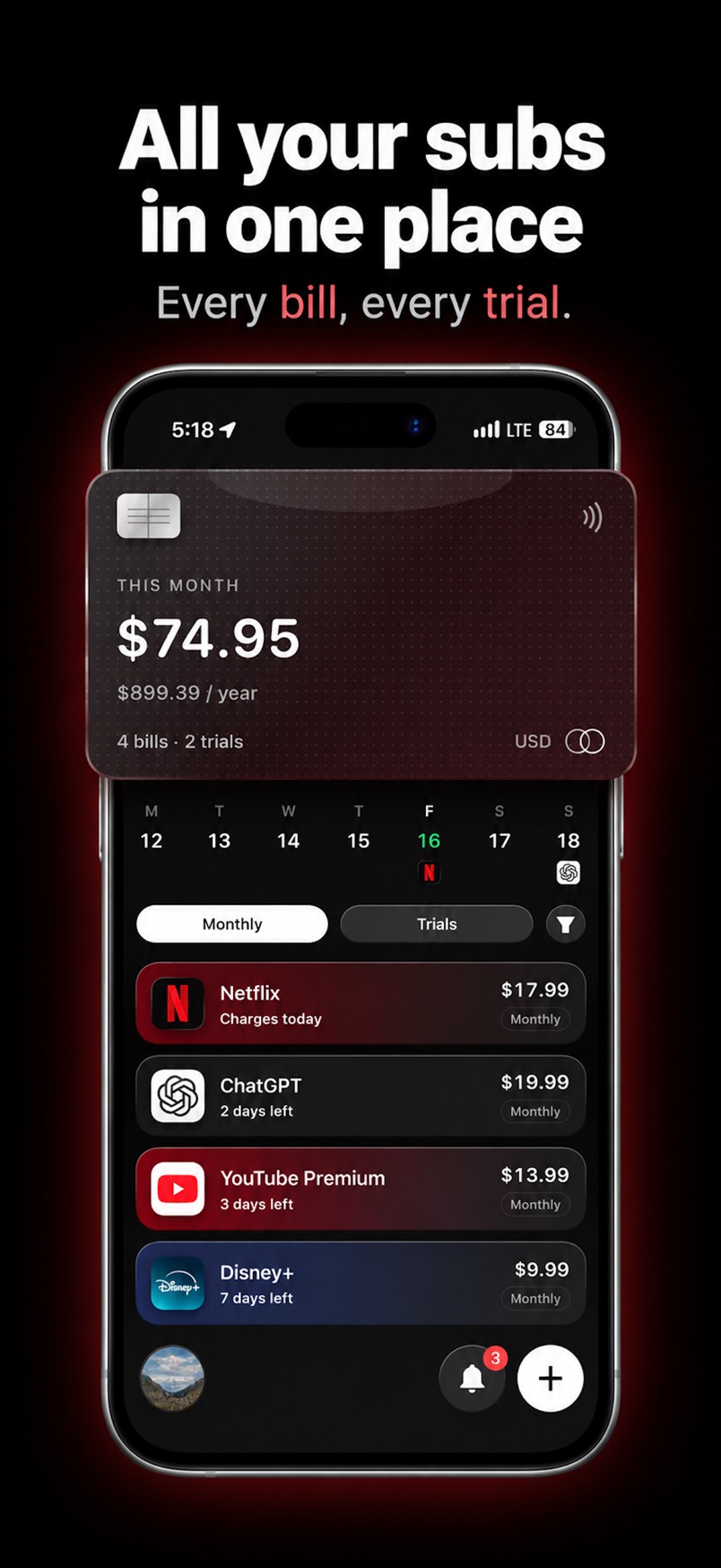
If a bill is in another currency, Subry converts it into the home currency you pick so the totals still add up. After you cancel a service yourself, you can mark it canceled and see the monthly and yearly amount you keep. Subry includes How to cancel help; it does not cancel the subscription for you.
Seeing the yearly number is often the moment it is easier to judge a cancellation. If a charge is coming up and you are still deciding, set a bill reminder on iPhone so you are not surprised by the renewal.
How much should I spend on subscriptions a month?
There is no official cap. Survey averages are a reference point, not a rule: C+R’s 2022 itemized average and MarketWatch Guides’ 2025 median differ because the questions and the mix of services are not the same. A household that shares several streaming plans will land in a different place than someone who only pays for music and iCloud.
A practical approach is to look at your yearly total, drop anything you no longer use, and keep a reminder on the rest. For an App Store free trial, Apple says to cancel at least 24 hours before the trial ends; the steps are in how to cancel a free trial on iPhone before you're charged. For a comparison of iPhone trackers, including apps that connect a bank and apps that do not, see best subscription tracker for iPhone.
See your monthly and yearly totals
Download Subry on the App Store, import a screenshot of your subscriptions, add the bills Apple doesn’t show, and check the overview card. Free to download. Requires iOS 26.

Frequently asked questions
How much do I spend on subscriptions a month?
Add up every recurring charge you still pay, including plans that are not in iPhone Settings, and convert them to a monthly figure. Subry can start from a screenshot of Settings → Subscriptions, let you add the rest by hand, and show a monthly total and a yearly total.
Does iPhone Settings show my total subscription spending?
No. Settings → your name → Subscriptions shows plans billed through that Apple Account. Website sign-ups, another Apple Account, a family member’s purchases, and bills from a carrier or another company will not appear there.
How much does the average person spend on subscriptions?
It depends on the survey. C+R Research (1,000 U.S. consumers, April–May 2022) found an $86 first estimate and a $219 itemized average. MarketWatch Guides (1,000 American subscribers, 12 June 2025) found a median of $60 a month, and 19.9% did not know how many subscriptions they were paying for.
Does Subry need my bank login to total my spending?
No. You add bills from a screenshot or by hand. Subry does not log into banks and does not read your card number. The totals only include what you add. A bill can be in any currency; Subry converts it into the home currency you pick.