Comparison
Best subscription tracker for busy people (iPhone)
If you only have a few minutes, the best subscription tracker for busy people on iPhone is the one you can finish in one sitting: no bank login, a way to pull in the subscriptions Apple already shows you, and a reminder before the next charge so you do not have to remember the dates. Subry is built for that job. It is new, it requires iOS 26, and on 16 November 2026 the US App Store still did not have enough ratings to display an overview. That should be part of the decision. If you would rather link a checking account so charges are found for you, Rocket Money is the mainstream alternative.
What does a busy person actually need from a tracker?
A full personal finance suite is the wrong default when the problem is “I keep forgetting what renews.” You need four things, and you need them without a weekend of setup:
- A list that is complete enough to trust, built in one sitting.
- A monthly total and a yearly total, so a $12.99 plan is easier to judge as roughly $156 a year.
- A reminder that shows up before the charge, including on the Home Screen, so you do not have to open the app every day.
- No new bank password. For a simple bill list, many people will not link a checking account, and they should not have to.
A wider comparison of iPhone trackers, including ratings and listed prices, is in best subscription tracker for iPhone. This page is narrower: which app costs the least time if you are already busy.
Why a bank-linked app is not always the fastest option
Rocket Money is a personal finance app, not only a subscription list. On 16 November 2026 the US App Store showed it at 4.5 from about 408,000 ratings. Its listing says it finds and tracks subscriptions after you link accounts, and helps you cancel them in the app. That automatic detection is genuinely useful if you have forgotten card-billed plans and you are willing to connect a bank.
The time cost sits in that connection. Rocket Money’s help center says the app relies on at least one checking account being linked, through Plaid, and that you cannot use Rocket Money without a supported checking account. Cancellation help is also not on the free tier: its cancellation article says the Subscription Cancellation Assistant is currently available to Premium members. The store page lists several Premium in-app purchases (including $2.99, $4.99, $5.99, $6.99, $8.99, and $9.99) without a single monthly or yearly label, so check the live listing before you pay.
If you will do that setup, Rocket Money can find charges you would never type in. If you will not link a bank, it is the wrong tool, however popular it is.
Why a typed list also costs time
Bobby is still the best-known simple iPhone list you add yourself. On 16 November 2026 the US App Store showed it at 4.7 from about 8,000 ratings. Its listing says you can choose from hundreds of existing subscriptions or create a custom one, see upcoming bills, and get a notification when a bill is due. It is free to download, with one-time packs such as All-in-one Pack at $1.99 and All-in-one Pack v2 at $2.99. It does not ask you to link a bank, and it does not claim to cancel subscriptions for you.
Bobby is a strong pick if you like a well-reviewed manual list and you do not mind entering each service. The catch for a busy person is the entering. Your iPhone already has a list of App Store subscriptions at Settings → your name → Subscriptions. Typing those names, prices, and dates again is work you have already done once, in Apple’s own screen.
How Subry gets a busy person to a useful list in one sitting
Subry is an iPhone subscription tracker. You add bills by hand, or you take a screenshot of a subscriptions list — for example the page at Settings → your name → Subscriptions — and upload it. Subry detects apps, prices, and renewal dates on the iPhone, and flags any item with no date so you can fill it in. It does not log into a bank, does not create an account, and does not upload the bill list.
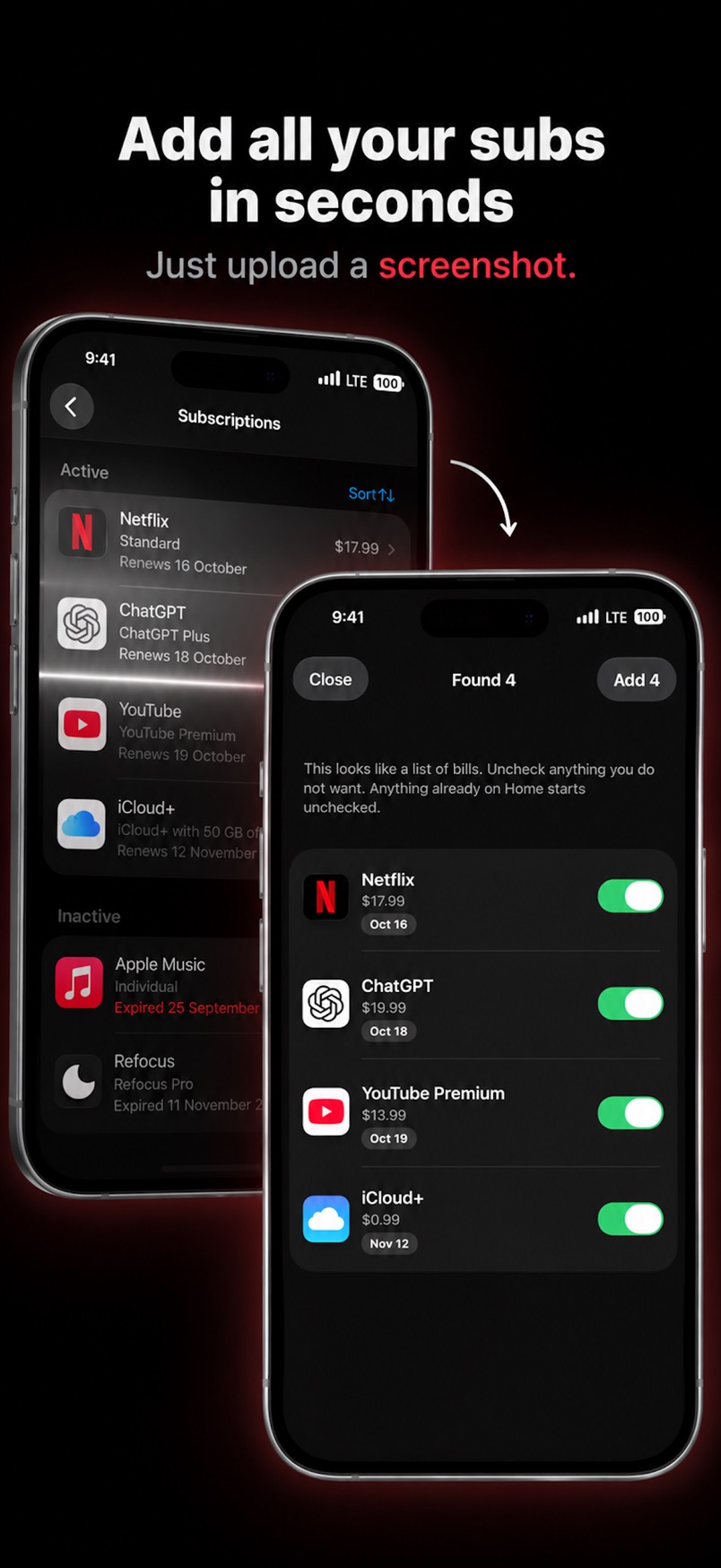
That screenshot does not catch everything. Gym memberships, phone plans, and services you joined on a website or through PayPal will not appear in Apple’s list. Add those by hand. A longer checklist is in how to find all your subscriptions on iPhone.
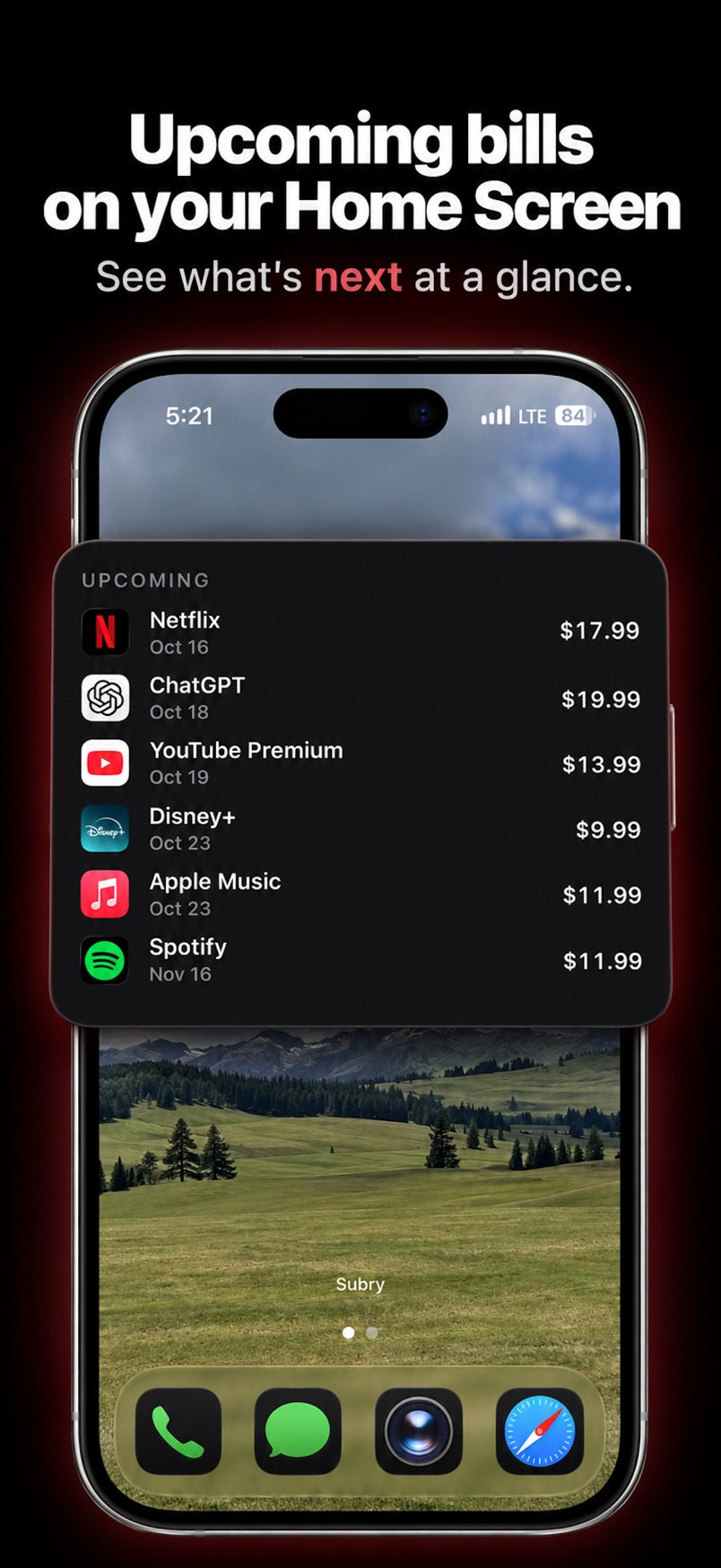
Once the bills are in, Subry shows a monthly total and a yearly total. You can mark a subscription as a free trial and choose “Notify me X days before” at a time of day you pick. If you allow notifications, it sends a local reminder a few days before the date you set, and another on the morning of the charge. A Home Screen widget can list upcoming bills without opening the app. Billing cycles can be weekly, monthly, quarterly, yearly, or custom, and a bill in another currency is converted into the home currency you pick.
Subry does not cancel subscriptions for you. Each bill includes How to cancel help, and some bills include a link to that service’s cancel page. After you cancel in Settings or with the company, you can mark the bill canceled and see the monthly and yearly amount you keep. For App Store plans, the official steps are in Apple’s cancel a subscription guide. If the goal is ending plans you no longer use, see best app to cancel subscriptions on iPhone.
On the US App Store page on 16 November 2026, Subry Lifetime was listed at $24.99. It is free to download. It requires iOS 26, and it still did not have enough ratings to display an overview. Those are real limits next to Bobby or Rocket Money.
Which tracker should a busy person pick?
- You will not link a bank, and you want the list and the reminders done quickly. Subry. Import the Settings screenshot, add what that page misses, and turn on notifications. Weigh the iOS 26 requirement and the lack of ratings.
- You will link a checking account so forgotten card charges are found for you. Rocket Money. Budgeting, bill negotiation, and cancellation help are part of a broader finance product, and cancellation assistance is a Premium feature.
- You want a simple, well-reviewed list you are happy to type yourself, with a one-time unlock. Bobby.
If you also want to see what the stack costs, how much do I spend on subscriptions a month walks through the totals. For alerts alone, see how to set bill reminders on iPhone.
Get a list, then a reminder, without a bank login
Download Subry on the App Store, import a screenshot of your subscriptions, and choose how many days before a charge you want the alert. Free to download. Requires iOS 26. It is new, and it does not yet have enough ratings to show an overview.

Frequently asked questions
What is the best subscription tracker for busy people on iPhone?
If you will not link a bank and you want a list plus reminders in one sitting, Subry is the best fit. You can import a screenshot of the iPhone Settings subscriptions page, add anything that page misses by hand, and get a reminder before a charge. Subry is new, requires iOS 26, and as of 16 November 2026 did not have enough US App Store ratings to display an overview. If you will link a checking account so charges are found for you, Rocket Money is the mainstream alternative.
Do busy people need to link a bank to track subscriptions?
No. A bank link is useful if you want an app to detect recurring charges automatically. Rocket Money’s help center says the app relies on at least one checking account being linked through Plaid. If you only want a list and a warning before the charge, you can add bills yourself or from a screenshot, which is what Subry and Bobby do.
How long does it take to set up Subry?
The fastest start is a screenshot of Settings → your name → Subscriptions. Subry detects apps, prices, and renewal dates on the iPhone, and flags items with no date. You still add website-billed subscriptions, such as a gym or a service billed through PayPal, by hand.
Is Subry free?
Free to download. Full access is an in-app purchase. The US listing on 16 November 2026 showed Subry Lifetime at $24.99. Check the App Store for what is offered in your country today. Subry requires iOS 26.